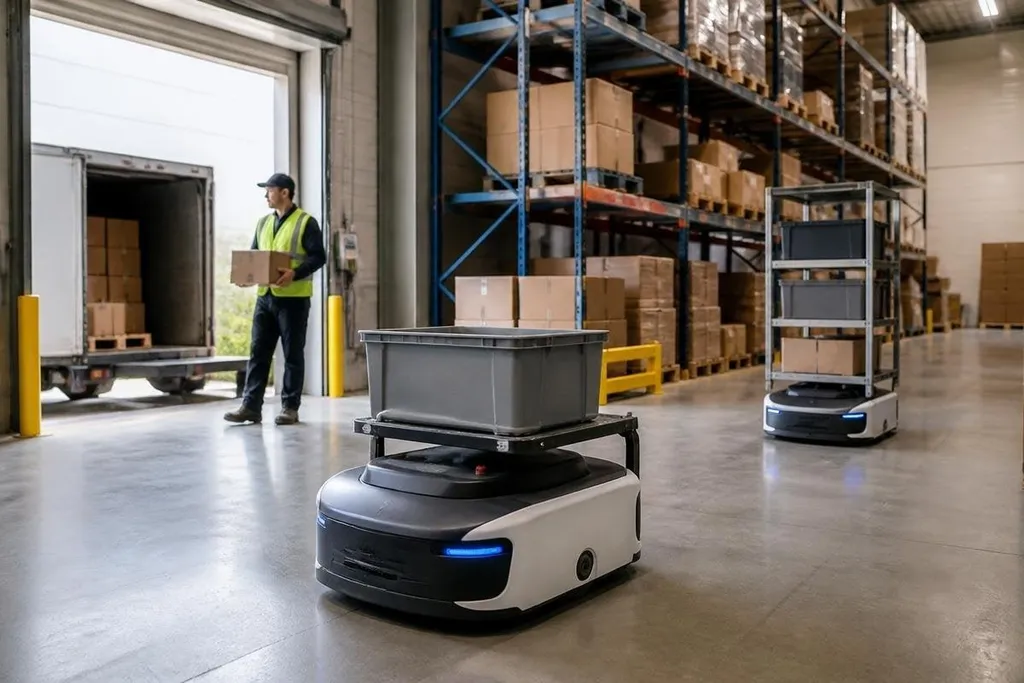
A logistics robot can move a tote, scan a barcode, or carry a pallet without waiting for a person to push it. The useful question for a supply-chain manager is where that work starts, what system directs it, and what happens when the robot meets an obstacle.
- Robots take on repeat trips between storage, picking, packing, and shipping.
- A warehouse management system sends jobs and receives status data.
- People still handle exceptions, repairs, safety checks, and many irregular loads.
Where robots fit
Most logistics robots work inside a defined part of a facility. An autonomous mobile robot, or AMR, uses sensors and software to move through changing routes. A guided vehicle may follow marked paths or fixed instructions. Both types can carry shelves, totes, carts, or pallets, depending on their frame and payload rating.
That division changes the work around the robot. A picker may stay at one station while an AMR brings the next tote. A worker at receiving may scan goods while a mobile robot moves them to storage. The benefit comes from cutting walking and waiting, so staff can spend more time on tasks that need judgment or hand work.
The robot still needs a clear job. Moving a standard tote between two known points is easier to control than picking mixed items from a damaged carton. This is why many sites start with transport inside the building before asking robots to handle loose goods.
The software link matters
A robot rarely decides the whole warehouse plan. The warehouse management system holds orders and inventory records, while a fleet manager assigns jobs to available robots. The robot then reports its position, battery state, and task status.
That data link affects the result on the floor. If the inventory record is wrong, a robot can deliver the wrong tote without making the mistake visible. If a charging station is full, jobs may wait even when the fleet has enough robots on paper. Good deployment work therefore includes maps, traffic rules, charging points, and a plan for manual recovery.
A robot that completes a route can still leave workers lifting damaged boxes or clearing blocked aisles. A report at Robot24.com can tie that result to a named machine, site, date, and human handoff, so a warehouse manager can judge which work the robot removes and which work stays.
What changes for workers
Robots change where people spend their time. In a goods-to-person setup, the item comes to a worker at a station. In a transport setup, the robot carries a load while people continue to pick, pack, inspect, or load trucks.
That shift can reduce long walks, but it adds new work. Someone must clear blocked routes, replace batteries or charging hardware, check safety sensors, and deal with labels the vision system cannot read. A site also needs training for stop controls and recovery steps before the first live order runs through the system.
The work may feel different even when headcount stays the same. A worker who once walked between shelves may spend more time watching task queues and fixing exceptions. The result depends on the layout, order mix, robot speed, and the time needed to recover from a stop.
Where the limits show up
Logistics robots handle repeatable movement well when floors, routes, and loads match the system design. They struggle more with clutter, blocked aisles, changing package shapes, poor labels, and work that needs touch or judgment.
A robot's payload rating also needs context. A platform rated for a heavy pallet may still need a level floor, a correctly placed load, and enough space to turn. A gripper that handles one carton shape may need a different tool for bags, soft packages, or damaged boxes.
Safety adds another condition. Sensors can slow or stop a robot when a person enters its path, but the site still needs marked zones, emergency stops, maintenance rules, and trained staff. Automation moves risk into the design and operating process; it doesn't remove the need to manage it.
A buying checklist
Before comparing robot models, check the work around the machine:
- Map the route: measure aisle width, door clearance, floor changes, and turning space.
- Count the load types: record tote sizes, pallet weights, carton shapes, and damaged-package rates.
- Check the software: confirm links to the warehouse management system and order system.
- Time recovery: measure how long a worker needs to clear a stop and restart the job.
- Price the support: include charging equipment, spare parts, training, software fees, and service work.
Start with one repeatable route and record blocked trips, manual touches, charge delays, and completed jobs. I'd skip a fleet purchase until those four numbers come from your own floor, because a smooth demo says little about a crowded shift.
The next decision is simple to state: can the robot complete a defined task often enough, with few enough stops, to pay for its place in the workflow? If the answer is still unclear after a measured pilot, the site needs better process data before it needs more robots.